Thursday, 31 March 2016

Shader Fix & Weather Particles

As I wasn't getting any good results I began to search out shader blending modes from Unreal Engine to see how someone would go and blend together 3 materials together as I clearly wasn't getting any good results from my method and couldn't figure out why.

Unreal Engine 4 3-Way Material Blend

Using this method I went ahead and began to do the same way inside of using ShaderFX.
As I was using a texture blend through the linear interpolate rather than the vertex color I just made sure that was wired up the right way.

New Shader Blend using the 3-Way UE4 Material Blend

When I went to check if it worked I realized at this time the cubemap I had created I had left back on the computer at home when I was working on this testing. I did some more research into the reflection node using the Maya documentation and then found out that I could use a texture rather than a dds cubemap, wish I had found that out before I spent hours trying to work out the dds cubemap.
With the texture reflection map I could use a node called "Spherical Reflection UV" which would turn the texture into a reflection sphere.
I went onto the internet and found a jpeg for a HDRI image. I went for something which was a forest snow.

New Reflection set-up

 With the forest sky that I found, I released that when I had put it into Maya that the way I want the reflection was upside down, so if I look down at the texture the HDRI forest ground was reflection back rather than the canopy of the tree branches above. I went into Photoshop and made sure I flipped the Y axis to get the desired effect.

Forest Sky used before flipped in Y-Axis.

The next part in the shader was now to get a good enough blend going on with the snow and also with the rain.
In the past week or so I had some issues with getting the blend to come out nice, when I made a height map for the water it had a odd part which made the material just have black spots in part which was shown in the previous blog post.

I felt comfortable that the snow had a nice enough blend with it however with this new shader linear interpolate set up I just had to make the I used a invert one-minus node to bring in the blend correctly.

With the water I had more shader math so the blend came in using a height from the brick which was a different version I used for the snow blend. I then used a grunge noise from Substance Designer to add more to the water blend.
I then made sure to clamp the values so I didn't have any odd artifacts show up.

Top - Snow Blend | Bottom - Water Blend

After a few tests and changing some things the blend worked well. I then went ahead and exposed tons of values I would want to change through code or give the user (and lectures) the ability to change values without having to go into the shader itself to find it.
This also needed to be done because when this is handed in the chances of the textures even being linked is unlikely and the set person would have to set the link up with the texture again.
I also went and created a UV scale on which was multiplied with a float so I or a user could change the UV scale of the brick and water puddles.

Snow Transition


Water Transition

The next thing to do now was to create the particles themselves to show what weather the environment is in.
Firstly I started of with the rain. I used nDynamics for this and with the nParticles I set it to points. I then duplicated the floor tile texture and brought it above the floor material and then flip it and used emit from object surface.
For the rain I went down into the shading part of the nParticle and set points to streaks so it looks more like rain.
I then changed the floor with a passive collider and and gave it some bounce so when the rain hit it the water would bounce the drip as it would in real life.
I also had to go ahead and change the emitter particle rate because as default I set it to around 300 and it looked like to much rain to me and after a while the PC began to slow. To reduce the change of this happening I set it to 100 and made sure that when the rain did it bounce after a second or two it would then kill the particle.

Rain Particle

When it came to the snow I again used the points and did the same with the floor plane with making a duplicate, rising it above the floor itself, flipping it and having the particle emit from its surface.
I then went into the shading and change the points to sprites.
As I wanted a texture on the snow I looked through all the tabs in the emitter to change it to a gradient ball however, after searching each tab I couldn't find a way of adding a texture.
I then went to Google and in the past it was under the shading tab though now it wasn't there and I was unsure why that was the case. I even looked in other parts of the emitter but still had no luck.
After giving up trying to find it I thought of using my own method and going into the Hypershader, making a new Lambert and adding the gradient ball with its transparency and dragging it onto the snow emitter and voila! It applied the texture and I had my snow.
To get the transparency working I had to make sure the use lighting check box was ticked.
With the snow I also adding more variants to the lifespan of the snow, using a random range so that some of the snow could fade before it even hits the ground.
I also tried to make it look more like snow too with how the wind would effect it and how chaotic snow falling can be, however, it still seemed very uniform.

Snow Particle

Though I still wanted to get the snow looking a lot better, I thought that getting onto the scripting was now more important and I could do additional tweaks to the particles nearer the end if I have the time. The plan was also if I get the time also to have a small environment and maybe some different materials which have the same changes.

Monday, 28 March 2016

Shader and Cubemap

ShaderFX to me is different to some of the other shaders I'm more used to. The results are always strange which makes me wish I tried doing this in Unity and creating it using CG code which I have a little knowledge of.

I did try a mess with the idea of using to use the Substance plug-in for Maya and released it would most likely not work as well as I would want and might need a few more tweaks to get it working.

I began to learn a lot about how to get something looking better inside of ShaderFX, I created the shader as the last week results were not what I wanted.I also added an ambient light and directional light to the scene to help stop that darkening of the material when I rotate around the scene.
After re-creating the shader I had something that would now transition between dry and a snow state.


Material Dry State

Material Snow State

New Shader for the Material.

Now that I had the basic material change from dry to snow now it's time to do the water. I went around and created a reflection map (cube map) so that when the water comes into play you would see a reflection of an environment, just to help bring the realism and not just have it a color and look a little odd for this project. 

Reflection Cube Map

Cubemap

The cube map took me a while to figure out because it had to be in a dds file format and I had never done that before so I had to use a NVIDA plug in to create this. I also did try a AMD Cubemap gen tool as well but I wasn't getting the results I wanted from that. 

After I had worked out how to create this I then went onto creating the additional lerp to bring in the water as well.  
I also brought in an additional height map so that the transitions would look different from how each of the textures come into the brick. 

Updated shader with additional Lerp

Around this time I was beginning to worry as some other modules were becoming demanding but I also have been having so many issues with how the shader is looking for this material transition that I've gone over longer than I wanted to with creating this texture.

Though I added the new lerp it was creating some bad artifacts, for example now the texture had black spots. 

These would only ever go away when I brought in the water, however all that did was change the color of the snow and if I took the snow away the water wouldn't stay.

Black spots go when water lerp is set to more than or equal to 1.

When the snow lerp is set to 0 even the water goes.


Sunday, 20 March 2016

Creating the Material

This week I wanted to get started on the material/shader for this project to create the snow and water weather effects.
The plan is to use ShaderFX as mentioned before because the node based system seemed pretty easy to use and the previous experience from Unreal's Shaders should help me.

To get a better understanding of how ShaderFX works I decided to watch a few videos to get a brief overlook.


After I watched this I went about to think about making the shader.
As I had limited time to do this I planned on using some of my own textures and texture I found from elsewhere just because I don't have the time to make the textures all themselves.

This texture was created and found by the people at Game Textures which can be found and downloaded at https://share.allegorithmic.com/libraries/31


This snow texture was created by myself. 

As for the water, I was just going to have that as a simple vector color which would be black with a tint of blue and make sure my roughness was pretty high to get reflective water.

I began working on the shader and exposing parameters so in the future I could drive them in the code later on. 


ShaderFX only works with Viewport 2.0 and for some reason the rendering gave of an odd effect and the shader really needed some work as I wasn't getting the effect I wanted and I am not sure why it wasn't doing that because I've done shaders before and this is normally the way to do it. I also tried another way but I couldn't get the look I wanted. When you would rotate the camera you would the texture would just go....black.


I was also having issues on getting the snow to look the way I wanted. When the material transition to it being snowing, it would brighten up the texture giving it an ugly effect and it wouldn't cover the entire material.

I tried making 2 other shaders to see other ways of making it though I had the same problems.


I began thinking of other ways I could achieve this, first i was wondering if I could switch to Unity and try and create something in that engine and using C# and/or CG to create the shader to get it working.
I also looked at using the Substance Designer plug-in for the project with can run in Maya though I wasn't 100% sure how I could call the functions inside of Python.
After looking at some talks from GDC I think it somehow is possible but there isn't any documentation for it, I couldn't even find much in regards to making this effect in Unity, the only ones I found were in Unreal Engine.
Later this week my hard-drive choose to delete most of my university work. Lucky enough I manage to recover a lot of the modules and I manage to get the textures back however my scene for Scripting & dynamics was gone so I would have to re-create the material. 
It also didn't help that this week I was ill and didn't get as much done because of that.

The next week I'm going to try to either make a better shader using the ShaderFX or try using the Substance plug-in and to use the Substance Designer to make the material transition and expose paramaters that I could hopefully change via Python 

Saturday, 27 February 2016

Research into Dynamic Weather in Games.

These next 2 weeks would be researching into dynamic weathers, more research into Python and expressions and getting the learning contract done.

The lesson this week was just as daunting as the one last week. It was pretty programming heavy and some of the syntax that was being used I had never done before.
For example when using Global variables I wasn't sure what that was but I felt I had a slight idea. In Unreal Engine 4 with the Blueprint system I can create something called a public variable. I asked Grant if they were the same thing and he said yes which eased me a little more.

As I felt lost with all the programming (though I was told only this and last week was more programming heavy) I looked up for another video that did the Python and Expressions together. Though I had watched the Digital Tutors sword trail video I felt that it would benefit me to try and get around to making that just to keep that in my memory. 
I also found another one that Autodesk did as well which I wanted to try and get around to doing around the other modules as well as the main artifact for this module. 


Introduction to Python Scripting in Maya - Part 5.


As I wanted to do the dynamic weather which affected the materials in the scene I then looked and researched some videos for what I could do with my one. 


Unigine Game Engine - Day/Night Cycle + Weather Test.

This Unigine demo is a great look at what weather could do to the environments, however, this video only shows more of the wind having an effect. The materials don't seem to change at all, when the camera is pretty close to some stones it shows they still look pretty dry.


CryEngine Tech Demo - 2:09 Procedural GPGPU Weather.

At the 2:09 mark with the procedural weather this is the type of system I want to create for this project. You can see the water showing when it begins to rain and then when it is sunny and no longer raining the rain starts to dry up. This is a great example to show what the engine does and hopefully will give a reason for more games to implement it.


Dynamic Weather System in UDK

This is using a previous generation engine but this shader works well with the engine. If this engine could do it, it is curious on why some older games do not try to do this as well. However, we don't get shown the shader it self and the programming which could have gone into this, so it could be that games in previous generation did not implement this because of memory, this video works well but what is it like with its memory.


Weather Time Lapse - Skyrim Enhanced Shaders

Skyrim is a very big game and back in its say there wasn't a reason to flaw much of the game. The Weather in Skyrim has had many different versions since its release due to modding, which can give it more of a realistic look, however, most of these shaders only change the weather itself and never the actions of players and the materials. There could be a MOD like that however, I have not found it yet.

The Witch 3 'Dynamic Weather' PS4

The Witcher is one of the recent next-gen releases on the PlayStation 4 and has a dynamic Weather system on which changes the look of materials as well. So Garret will look wet on his clothing if he is outside in the rain. 

Driveclub: Dynamic Weather

Driveclub is another next-gen release on which has a good focus on its dynamic weather and how it changes the materials in the world, this is the second next-gen game I've found with this type of change.


Tom Clancy's: The Division Snow drop Engine Tech Trailer - 1:51 Dynamic Material Shaders

The Division is another next-gen game with the dynamic weather on which changes the way the materials look in the world, even on the assets laying about.

Out of all these videos, the last 3 are from reasonable newer games which have a little more fidelity to their environments. With older games and there use of weather it was more or less there to set the mood.
The dynamic materials from The Division is what I wanted to do with the environments and the weather system.
With more of the newer generation games implementing the weather system it does show that due to the memory of older platforms that this couldn't have been done before, with memory being much larger, weather effects changing materials is more likely going to happening.

I'm not partially sure what I'm going to do in the environment and I'll need to create some textures for the scene reasonable quick to make sure I don't fall behind on my plan that I make for the learning plan.

The video 'Dynamic Weather in UDK' & The Division video, is what I would like to do with my materials. As for the weather I'd like it to be pretty standard but still readable by the viewer so they know what it is.
If I had/have the time I'd like to try get a tree that possibly moves in the wind too.

For my learning contract I found some pretty good reference I could use for this too.


Friday, 12 February 2016

Finding a Problem

After speaking with Grant I learnt that we didn't need to have the use of expressions in this module, for that reason I began to think more of what I could do.
I really wanted to do something that would require texture and shader work but I don't know how to write HLSL and last time I touched CG was like very basic stuff back in 2011.

For what I wanted to do with textures I thought I could create something like a shader for lets say for example a Molotov hits a wooden floor and in a game it hurts a player, but what does it do to the environment?
Nothing most of the time, so here I have a problem I could solve.
The reasoning to me not continuing with the rice bag concept was that Naughty Dog made it, it's not a problem in games either. I wanted to create something more dynamic in relations to materials with a problem on which I could solve.

With this fire burning wood if hit by a Molotov I thought it could be a great idea, but it seemed like a very small concept.

As I wasn't too sure how I would work this with the shaders inside of Maya because I only had done something with shaders inside of UE4 before, I went into research what Maya had to show. I then remembered a shading module called ShaderFX and knew this worked with the Viewport2.0 and used PBR (Physically Based Rendering) textures.
I then went from there to do some research on this tool as it was a node based shader development which was almost like the Unreal Engine one.

One of the first things I searched was ShaderFX and Python, to make sure I could very much control the shader through Python, I didn't find much but from what I found it kind of showed that it was possible to do this.

EDIT - The video that used to be here demonstrated a random shader assignment using Python and ShaderFX but the author appears to have recently deleted the video so it can no longer be used.

Another video I found was even more helpful because not did it only just show the tool but it also made the python script downloadable so I was able to look into the code to help me work out how I would do something with ShaderFXs. 

[Downloadable Link]

This was great stuff and super helpful as I was able to know that I could work with both ShaderFX with the Python scripting.
I kept the wood burning idea in my head and waited till the weeks lecture started so I could ask Grant about it.

----------

This weeks lecture was super helpful, we were shown previous examples of what students had done in the past, great! Now I was getting a more concrete idea of what I could develop and achieve.

Thought the wood burning one would be good I didn't really know if it was big enough or how I would go about making a area of burning effect.
From the lecture I was hit by the weather effect one, I was like hmm, I wonder if I could make something a bit more advanced from that.
Last semester I was doing freelance work for a tutorial studio called 3DMotive, it's like Digital Tutors but more aimed towards video game tutorials.
One of the materials I did for a recent course [Link to course] was creating a dynamic material that would go through change if it was raining, snowing or sunny.

I then thought, what if I created a dynamic weather system that effects the environment?
This hadn't been done much in video games to my knowledge and it could be a great place to start the research and find out what to do with this.

Thus began my journey on pushing forward with creating a dynamic weather system inside of Maya which put the focus on texture changes from the weather.

I spoke with Grant and he seemed okay with this idea...Great!


Tuesday, 2 February 2016

The Rice Bag

This week I was thinking of nailing my idea down a little more but I still wasn't 100% sure what was the requirements so I made it my job to pitch this idea and ask Grant about the module and how free it was and did it need to include expressions or just scripting.

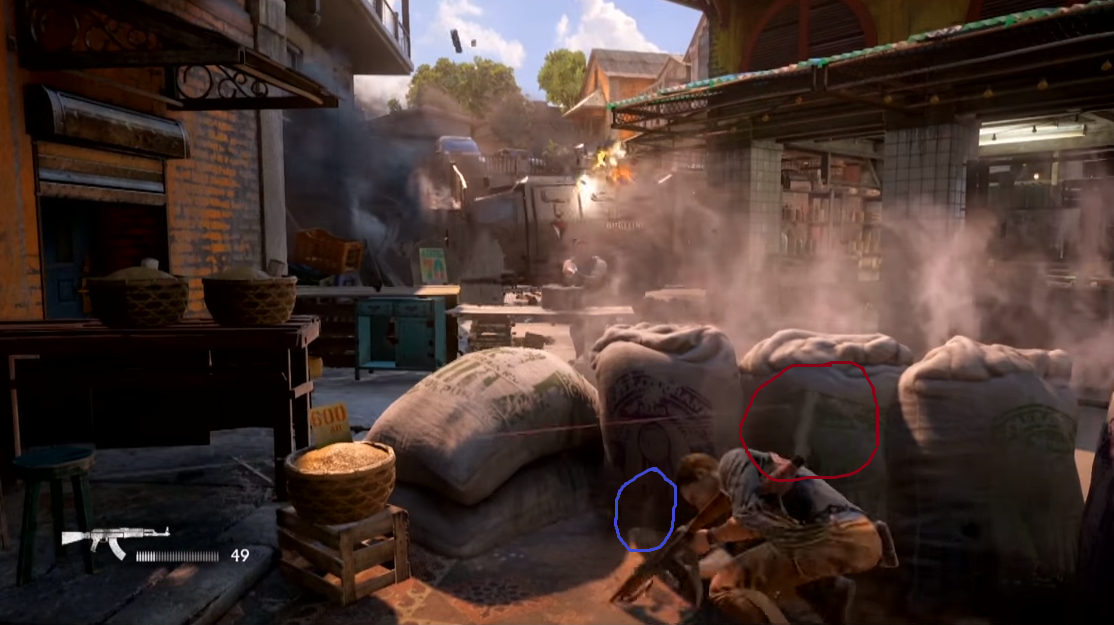
I wanted to pitch this idea to do something that I saw in the trailer of Uncharted 4 and try to re-create the same idea as I thought it would make an interesting module topic.

Below are some pictures of the rice bag and it's dynamics which was taken from the Naughty Dog HeadSpace VFX video from week one.


Uncharted 4 Tech Art Demo - [Link]

As you can see the bags (circled in red) are used for cover, when they are hit by a bullet the rice sack would then begin to leak out the rice (the purple circle). The bag after a time will begin to deflate as you can see from the last image clearly.

I wasn't sure how I would achieve this and I asked a guy I know who worked as a VFX artist at Bioware how they normal go about creating VFXs for games and do they just use Maya as I wasn't sure if I could or wanted to do everything in Maya as I wanted to special in games which use engines.
His reply was "making rice come out of a bag will be tricky but can be achieved by using the volume of particles to drive the bags mass".
He also said Maya is normally great for prototyping but they wouldn't normally use just Maya to create all the effects.

I wasn't really sure how I would do this in just Maya or what to even start with, but I made some guesses that the bag might be achievable in Maya and having a particle emit from a set point where a bullet would have it to have rice drop out.

Maya 2014 nCloth Inflation Tutorial by Stuart Christensen


Wednesday, 27 January 2016

Further Research

For this module I want to create VFXs inside of a game engine using Unreal Engine 4 as the game VFXs is what I want to specialize in for this module.

Unreal has a particle effect system called "Cascade" on which I have a little experience in using but wanted to push my knowledge inside of it. 

I began looking at types of effects I could make inside of the engine, however when I did this I wasn't sure what I problem I wanted to try and solve as of yet, I was hoping this research would help me work this out.

As I want to be a texture artist I wanted to do something that would require the use of textures/Shaders, though I don't know how to write shaders I have a knowledge of the node based shaders inside of Unreal Engine 4, I wouldn't mind doing something similar to this. 


Fire and Water Shader Effects inside of Unreal Engine 4

Another idea was to work on magical effects for players that you would typically see in games such as League of Legends, DOTA and ect. 


Magical Effects in Unreal Engine 4

One of the other ideas was to create something like dynamic foliage that would move as the player interacts with it, this idea spurred from last week blog from the Naughty Dog Headspace video. This was one I found with someone trying it out in Unreal Engine 4 (UE4).

Unreal Engine 4 Interactive Foliage Material Test

I also had the idea of doing something like an ocean that interacts with wind and what ever was on the water would interactive with the waves. This idea was brought up from playing Assassin's Creeds: Black Flag with how the ship reacts with the ocean. This is a video I found of someone working on a ocean inside UE4.

Unreal Engine 4 - Ocean Storm WIP

Next I would need to find out if this is what would be okay for the module and then to work out a problem that isn't in most games that my version of these could bring to the table. 

Tuesday, 19 January 2016

VFXs in Games

From the start of being on the masters I originally wanted to be a VFX artist for video games.
For this module I wanted to put the focus on that. Though my idea of where I wanted to go in the industry has changed and become more concrete I have chosen to become a texture artist in the industry.

Which means for this module I would like to focus on something that either uses shaders, a game engine or just make it a way I can experiment in Maya with the dynamics.
Though I know I want to become a texture artist, this could lead into working in the VFXs studios in films who look for texture artists which go into the VFXs, for example MPC, Industrial Light & Magic and Double Negative are just some of the VFXs studios that look for that role.

This module however will be put on the original focus on that I wanted to give VFXs in games a go. The objective now was to find a problem on which I could solve and create within this module.

Below are videos I found that talk about VFXs in games, one is even a video from Naughty Dog about hiring for that role. I've also added some showreels for VFXs in games too.

Working for Naughty Dog - VFX
Headspace: Naughty Dog - Technical Art


Digic Demo Reel 2014


Autodesk Games Customers Showreel 2015